Livestreaming Online
Start creating content that engages with your followers on Twitch, YouTube or Facebook.
Integrate webcam commentary into livestreams with additional overlay objects.
Use a Custom Streaming Server
Not only does Screen Recorder let you stream to your favorite platforms like Twitch, Facebook & YouTube Live, it also lets you use custom streaming servers to reach your audience.Multistream to Twitch, YouTube, Facebook and Custom Servers
Screen Recorder lets you multistream to up to five different services. This means you can simultaneously livestream to Twitch, YouTube, and Facebook, plus up-to two additional custom servers. It's an easy to reach a wider audience without the need for additional relay servers.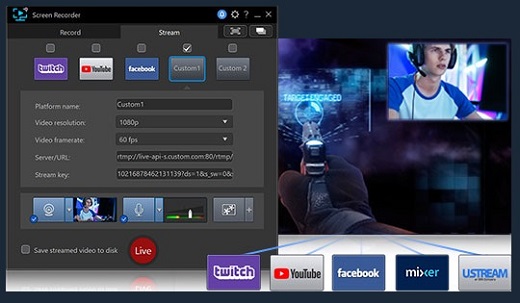
Integrate Your Webcam into Livestreams
Share more than just your gameplay. Share your gaming secrets, reactions and commentary with your viewers by integrating webcam & microphone audio and video on top of your in-game footage, even when you’re streaming from a gaming console. You can also use chroma key to apply a custom background.
Reduced System Footprint
We understand that CPU and GPU processing power is vital for smooth gameplay and streaming. While other screen capturing solutions consume far too much of the precious processing power that gamers require, we’ve taken every step possible to ensure Screen Recorder minimizes CPU & GPU load as much as possible for your gameplay.
Record & Edit with Ease
Record & edit content to provide your audience with videos that are detailed, high-quality, and informative.
Record with Chroma Key
Get creative when adding webcam footage to your screen recordings. Remove the background from your webcam footage thanks to a powerful chroma key engine, and replace it with your own cool, creative background image.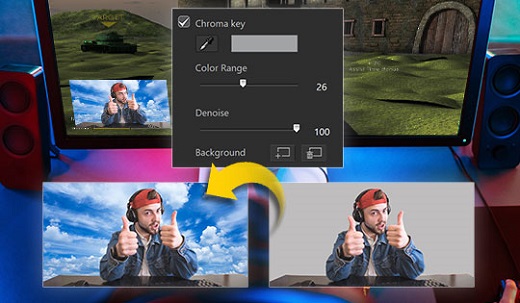
Add Overlay Objects to Recordings
Overlay objects to your desktop and webcam recordings. It's an easy way to brand your videos, promote a sponsor, or add a unique watermark to your recordings.
Customizable Hotkey Support
Get recordings started quicker, mute and unmute instantly, pause without having to touch your mouse, and quicklt take screenshots by setting customized hotkeys for recording and streaming.
Real-time Webcam & Mic Preview
Setup recordings faster with real-time webcam & mic previews. See exactly what you'll look like before you hit record using the preview window, and quickly adjust resolution and settings. The microphone preview allows you to quickly adjust volume and preview audio levels.
Record from PC or Connected Device
Whether you’re a vlogger, gamer, or how-to expert, Screen Recorder will have you producing high-quality, detailed videos in next to no time. Record your whole screen, just a window, or lock to a specific app. For gamers, you can record gameplay from your PC even in exclusive mode, and also capture directly from your gaming console!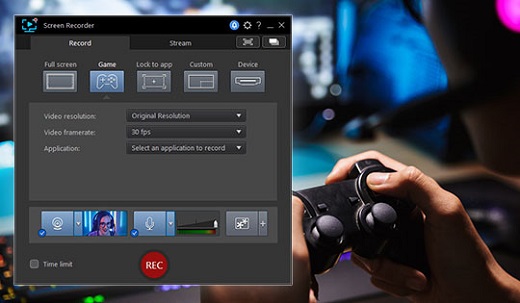
Easy-to-use Editing Tools
Don’t spend hours figuring out how to edit your footage. Screen Recorder comes with a remarkably simple editing interface that allows you to quickly import and trim your footage, add titles and transitions, and also now add two unique audio tracks.